
Name and product URL
Read from each product card on the shop or category page, so the list is complete even before any product page is opened.
Open a WooCommerce shop or category page, click the icon, and Web Product Scraper lists every product as a table: name, sale price and regular price, and the photos. Let it open the product pages for the full description, the SKU and the gallery at full size, then export Excel, CSV or JSON, or one ZIP with a folder per product. Free, no account, nothing leaves your browser.
Add to Chrome, it's free No account · no server · nothing leaves your browser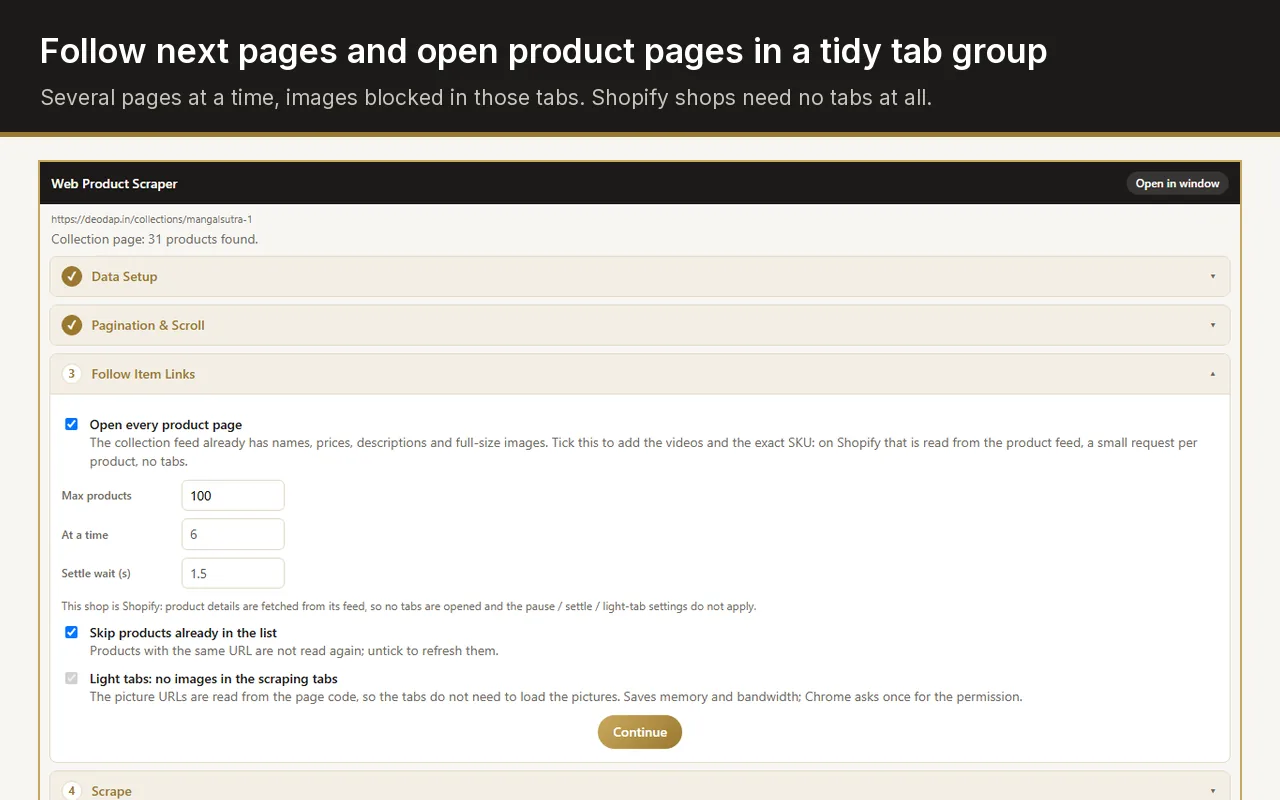
Open the shop or category page with Web Product Scraper installed, click the icon, and download the list as CSV or Excel. Tick "Open every product page" first when you also need SKUs, full descriptions and the full-size gallery. Sale and regular prices come out as two separate columns.
The shop page gives the list; the product pages give the details.
Read from each product card on the shop or category page, so the list is complete even before any product page is opened.
WooCommerce shows a struck-out regular price next to a sale price. Both are read: the sale price as the price, the regular price as the MRP column.
From the product page: the SKU line, the full description as text, and the category from the breadcrumb.
Every image of the product gallery at its original size, not the shop-page thumbnail, plus product videos when the page has them.
"Add to basket" buttons, badges and "related products" blocks are recognised and left out, so the table holds products only.
Type a prefix such as XX and every product gets a code: XX-001, XX-002, in page order.
Four steps in the Chrome side panel, while you look at the shop.
The shop page, a category, a tag or a search result: any page that lists products. The panel shows how many products it found and the table.
Remove the columns you do not need. Add a code prefix if you want product codes.
WooCommerce paginates with numbered pages. Set "from page 1 to page N"; the run follows the pages with a pause between them.
Tick "Open every product page" for the description, SKU and full-size gallery. Pages open several at a time in one collapsed tab group, with images blocked in those tabs so Chrome stays light. Then download Excel, CSV, JSON or the ZIP.
WooCommerce shops all share the same page structure underneath their themes: product cards with a title link, a price block that may hold a struck-out regular price, and product pages with a gallery, a summary and a description tab. Web Product Scraper has a WooCommerce reader that knows that structure, so it reads the right price on a sale, skips the cart buttons, and finds the gallery images at full size.
When a theme does something unusual, "Teach this site" fixes it in a minute: press Pick next to a field, click the right value on the page, and the panel shows the result at once. Save it as a profile for that shop and it is used on every page of it, including the product pages a run opens.
A single product page is handled as one product, with its own photos ticked and the related-products block never included.
Scrape a wholesaler's WooCommerce category, keep the columns you need, add your codes, and get every photo in a folder named after the product.
Export the products with names, prices, SKUs, descriptions and full-size images, then import the CSV wherever you are going.
Export price and regular price for a category to Excel, and run it again later: products already in your list are skipped, so only new items are added.
Most WooCommerce scrapers are paid desktop tools or web services that ask for the shop's address and run on their own servers. Web Product Scraper runs inside your Chrome, on the pages you open, and sends nothing anywhere. It also keeps working when the next supplier runs Shopify, Magento, BigCommerce or a custom shop, with the same four steps and exports.
It is free without a paid tier: no watermark, no sign-up, nothing locked behind payment. Site access is requested per shop, only when you start a run there.
The table holds one row per product with the price shown on the shop page and the SKU shown on the product page. Variation rows are not exported at the moment.
Use "Teach this site": press Pick next to Price and click the price on the page. The rule is saved for that shop and applied on every page of it.
You choose, between 1 and 10, with a pause between page loads. The pages open in one collapsed tab group with images blocked, and the group is closed when the run ends.
You are responsible for how you use the data. Read the shop's terms, take only what you need, and keep the default pauses; the extension reads only pages you open yourself and stops if a site starts refusing.