
Your own store: use the Shopify admin
You do not need this extension. In your Shopify admin, open Products and click Export: Shopify gives you a CSV with every field and every variant, in the format its own import accepts.
Open a Shopify collection, click the icon, and Web Product Scraper reads the whole collection from the shop's own product feed: names, SKUs, prices, compare-at prices, descriptions and full-size photos, ready to export as Excel, CSV or JSON, or as one ZIP with a folder per product. A free Shopify product scraper: no account, nothing leaves your browser.
Add to Chrome, it's free No account · no server · nothing leaves your browser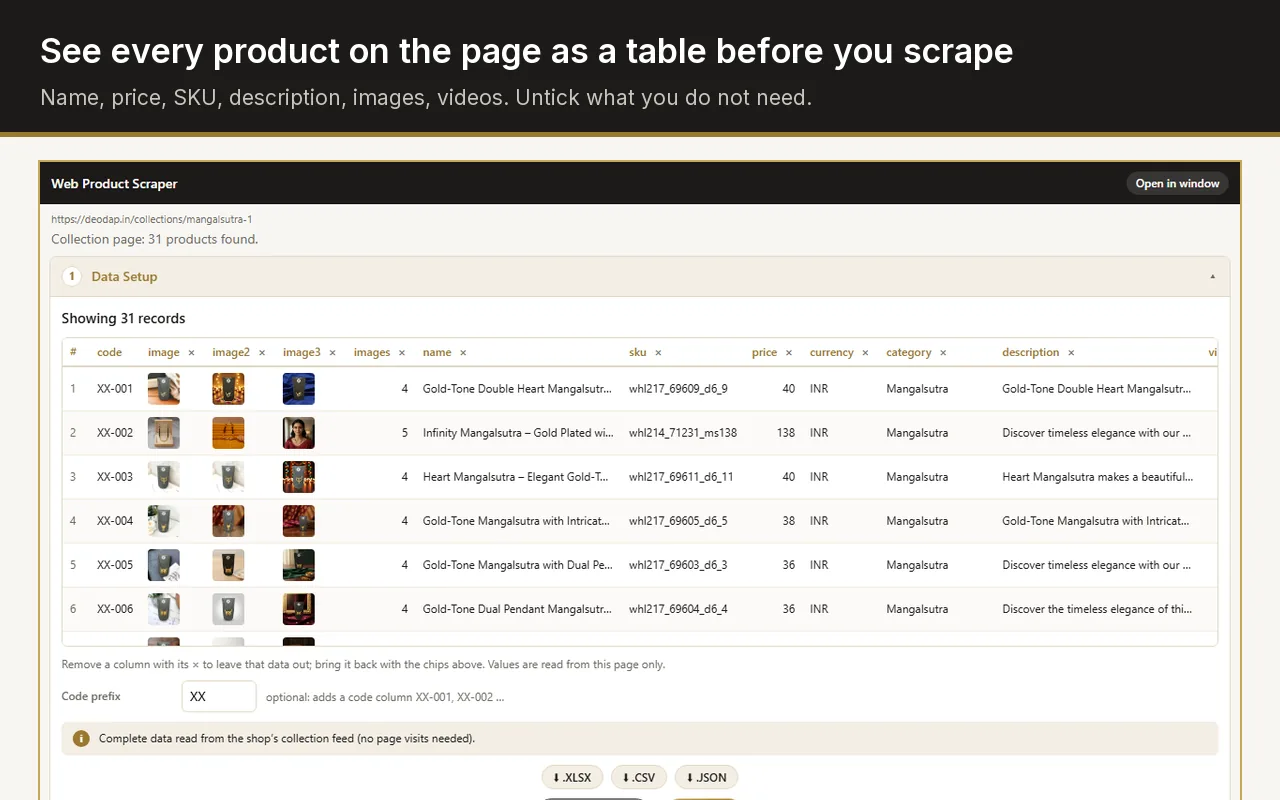
Add Web Product Scraper to Chrome, open any collection of the Shopify store, click the extension icon and download the list as Excel. It reads the collection from the store's own product feed, so names, SKUs, prices, compare-at prices, descriptions and full-size photo links arrive in one spreadsheet without opening a single product page.
You do not need this extension. In your Shopify admin, open Products and click Export: Shopify gives you a CSV with every field and every variant, in the format its own import accepts.
A supplier, a wholesaler, a store you are leaving without admin access, or any public catalogue you are allowed to use. Open one of its collections and export it, with no account on that store.
The admin export lists image links, not the images. The ZIP here saves every photo in a folder per product, named after it, which also helps with your own store.
The CSV here is a plain product table, not Shopify's import format. To load it into a Shopify store, map its columns in the import step.
Every field the shop publishes for its products, in one table.
The product title, the first SKU found among its variants, and the shop's own product id.
The lowest variant price and, when the shop sets one above it, the highest compare-at price as an MRP column. The currency is read from the store page.
The full product description as text, the product type the shop assigns as the category, and the vendor as the brand.
All product images at their original size, not the thumbnails of the listing. Product videos are added when you also open the product pages.
The canonical product address, so the row can always be traced back to the source.
Type a prefix such as XX and every product gets a code: XX-001, XX-002, in the order of the collection.
Four steps in the Chrome side panel, while you look at the store.
Any collection page of any Shopify store, whatever the theme. The panel shows "Collection page: N products found" and the table below it.
Remove the columns you do not need with one click. Add a code prefix if your marketplace or catalogue needs product codes.
Shopify collections paginate. Set "from page 1 to page N" and the run reads exactly those pages, with a pause between them.
On Shopify the details come straight from the store's product feed, so a collection of 50 products is done in seconds, without opening a single product page. Then download Excel, CSV, JSON or the ZIP.
Most scrapers read a Shopify store the slow way: they open every product page in a tab, wait for it to load, and pick values out of the theme's HTML. That breaks whenever the theme changes, and it hits the store with one request per product.
Every Shopify store also publishes its products as structured data, the same feed the store's own apps use. Web Product Scraper reads that feed for the collection you are looking at. The result is complete and consistent across themes, it includes the compare-at price and every image at full size, and the store sees one small request per page of the collection instead of one per product.
A single product page is handled the same way: one product, its own photos ticked in the panel, and the "You may also like" recommendations never included.
Scrape a wholesaler's Shopify collection, keep the columns your marketplace wants, add your product codes, and get the photos in folders named after each product.
Export a collection with names, prices, SKUs, descriptions and full-size images, then import it wherever you are going next, Shopify or not.
Pull price and compare-at price for a whole collection into Excel, and run it again later: products already in your list are skipped, so only new ones are added.
There are several Chrome extensions built only for Shopify. Web Product Scraper does the same job on Shopify, then keeps working when your supplier runs WooCommerce, Magento, BigCommerce or a custom shop: the same four steps, the same exports, and a "Teach this site" mode for shops it does not read correctly out of the box.
It is also free without a paid tier: no watermark, no sign-up, and nothing locked behind payment. Each run reads up to 500 pages and collects as many products as you set. The only things it asks for are the permissions it needs on the site you are scraping, requested when you start a run there.
Yes. It reads the store's public product feed, which every Shopify store publishes regardless of theme. Password-protected stores and products hidden from the online store are not available, because the store does not publish them.
The table holds one row per product, with the lowest variant price and the first SKU found among the variants. Variant-level rows are not exported at the moment.
A few seconds per page of the collection, because no product page is opened. A 200-product collection is usually done within a minute, including the photos list.
You are responsible for how you use the data. Read the store's terms, take only what you need, and keep the default pauses; the extension reads only pages you open yourself and stops if a site starts refusing.