
Photos sorted per product
Every image and video at full size, in one ZIP with a folder per product and the spreadsheet beside them.
Instant Data Scraper, Data Miner and Web Scraper are general tools for any table on any website. Web Product Scraper does one job: it reads a shop's products, with price, list price, SKU, brand and every photo, and gives you Excel, CSV and JSON plus one ZIP with a folder per product. Here is an honest comparison, so you can pick the right tool for your pages.
Add to Chrome, it's free No account · no server · nothing leaves your browser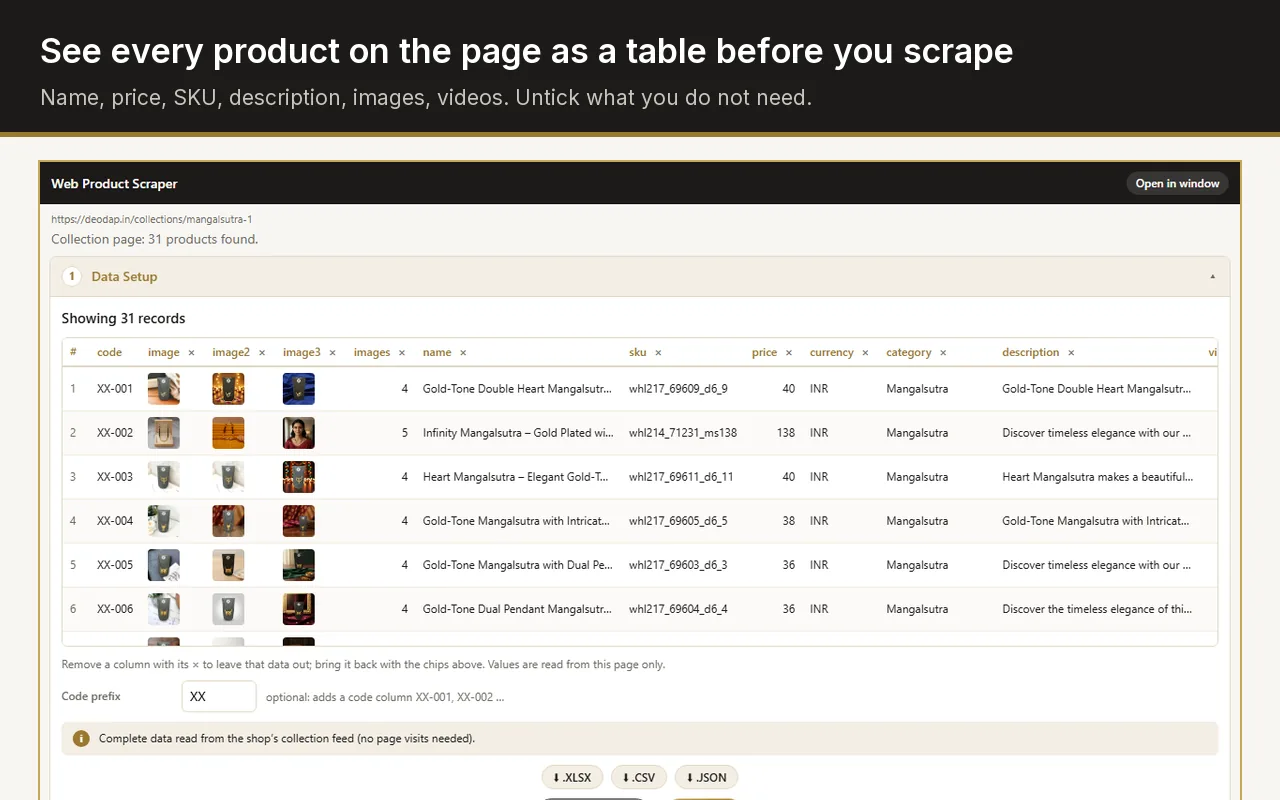
Yes. Web Product Scraper is free, with no paid tier and no account, and it is built for shop pages: it knows which value is the price, the list price and the SKU, opens each product page for the full description and gallery, and downloads every photo into a folder per product. Instant Data Scraper is also free, and remains the better pick for tables that are not products.
Checked on 19 September 2026 against each tool's own store listing or pricing page. "Not stated" means that page does not say.
| Web Product Scraper | Instant Data Scraper | Data Miner | Web Scraper | |
|---|---|---|---|---|
| Price | Free, no paid tier | Free | Free up to 500 pages a month; paid plans from $19.99 a month | Extension free; Cloud plans from $50 a month |
| Account needed | No | Not stated | Yes | Not stated |
| How it finds the data | Recognises products: name, price, list price, SKU, brand, description, photos | Detects tables and lists by itself | Recipes, public or your own | Sitemaps you build, AI-assisted |
| Next pages and scrolling | A page range, scrolling, Load more buttons | Next buttons or links, infinite scroll | Next page automation | Yes, through the sitemap |
| Opens each product page | Yes, several at a time; Shopify is read from its product feed | Not stated | Yes, it crawls a list of addresses | Yes, by following links in the sitemap |
| Export formats | Excel, CSV, JSON | Excel (XLS, XLSX), CSV | Not stated | Excel (XLSX), CSV, JSON |
| Photos saved as files | One ZIP, a folder per product | Not stated | Listed as "Download Images" | Not stated |
| Data stays in your browser | Yes | Yes | Not stated | Not stated |
Use Instant Data Scraper when the data is any table or list, not only products: directories, search results, tables of numbers. It finds the table by itself, follows the next pages and saves Excel or CSV. It has a million users and a 4.9 rating, and it keeps the data in your browser.
Use Data Miner when a public recipe already exists for the site you need and 500 pages a month are enough, or when you are ready to pay from $19.99 a month. It needs an account.
Use Web Scraper when you want a reusable sitemap for a complicated site, or need scheduled runs, proxies and an API, which its paid Cloud plans add from $50 a month.
Use Web Product Scraper when the pages are a shop's products and you need the photos as well: one row per product with price and list price, your own codes such as XX-001 added for you, and one ZIP with every image and video in a folder named after each product. Shopify collections come straight from the store's product feed, so a collection is done in seconds.
Every image and video at full size, in one ZIP with a folder per product and the spreadsheet beside them.
A struck-out price, a compare-at price or an "M.R.P." label becomes its own column, so sale prices are never mixed up.
Type a prefix such as XX and every row gets XX-001, XX-002, ready for a catalogue or a WhatsApp order.
When a shop is read wrongly, press Pick and click the right value once; the rule is saved for that site.
Yes. There is no account and no paid tier. Each run reads up to 500 pages and collects as many products as you set (100 by default); run it again to add more.
Yes. They are separate extensions and do not interfere with each other. A general table scraper and a product scraper cover different jobs.
It is built for product pages and product listings. For other kinds of tables, a general tool such as Instant Data Scraper fits better.
Nowhere. The list stays in your browser until you export it or clear it, and the extension talks to no server of its own.